
1. Introduction
Sprout is a high-resolution (96kHz/24bit) multi-effects processor based on the "Electro-Smith Daisy Seed”.
The preset effects available on Sprout are as follows:
- Tape Echo (Tape Emulation Delay, includes wow & flutter for a unique tone effect)
- Modern Delay (up to 10 seconds, with pitch shift and reverse capabilities)
- FDN Reverb (with pitch shift functionality)
ver2.0:
- Repeater (Record the input sound and repeat it by specifying the range)
- Sampler (Place samples in 16x16 slots and play them when the Gate is input)
Additionally, if you are a programmer, you have the ability to program your own custom effects. You can refer to the GitHub page for Sprout's programming examples at: https://github.com/centrevillage/SproutExample
2. Hardware Interface
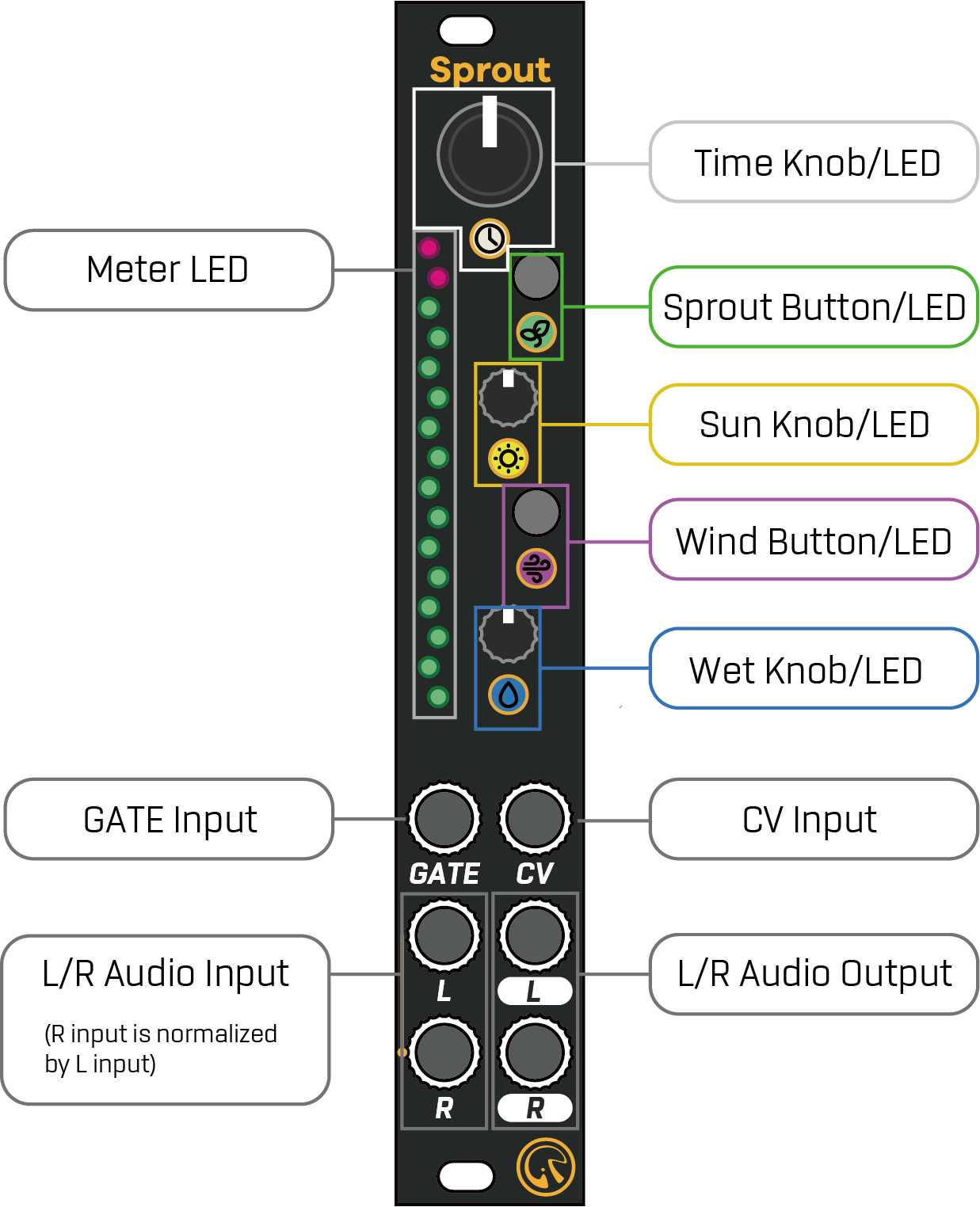
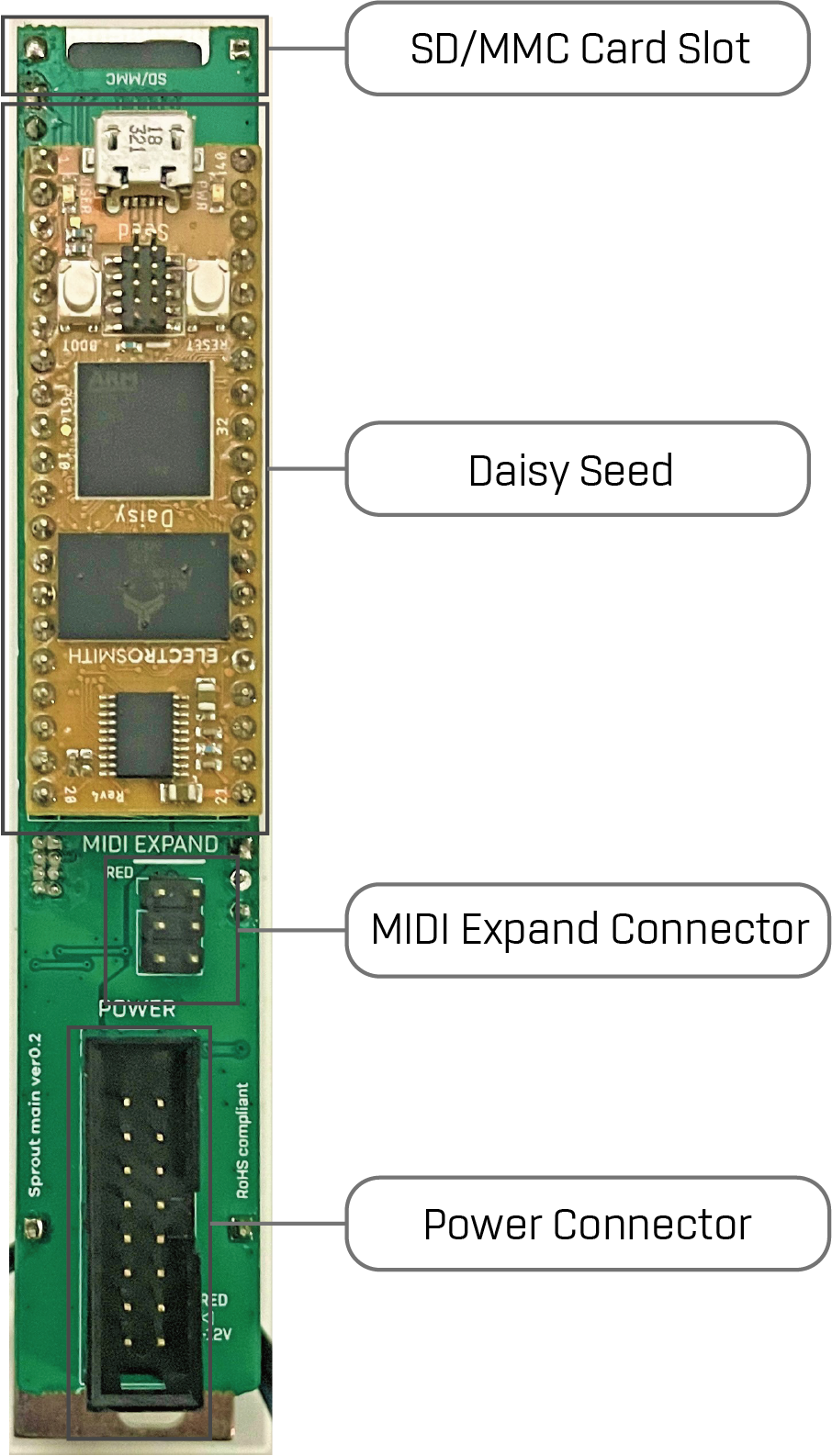
3. Factory Program
Factory Program has following 5 effects:
- Tape Echo
- Modern Delay
- FDN Reverb
- Repeater (ver 2.0)
- Sampler (ver 2.0)
And each control on Sprout has the following functions:
| Name | Description |
|---|---|
| Time Knob/LED | Adjust the time-like parameter. The LED indicates the current value by its level of brightness. If you press and hold the Wind button, it allows you to modify the secondary parameter. |
| Sun Knob/LED | Adjust the feedback-like parameter. The LED indicates the current value by its level of brightness. If you press and hold the Wind button, it allows you to modify the secondary parameter. |
| Wet Knob/LED | Adjust the dry/wet balance. The LED indicates the current value by its level of brightness. If you press and hold the Wind button, it allows you to modify the secondary parameter. |
| Sprout Button/LED | Change the current preset. The LED indicates the current effect by the color. |
| Wind Button/LED | Tap-tempo function. if you press and hold this button, it allows you to access the secondary parameter. |
| Meter LED | Indicate the output level as dB meter. The color of the meter, excluding the peak position, changes based on the current effect. |
| Gate Input | Clock Sync input. If the input receives a clock pulse, the time-based parameter synchronizes to this clock. If the input doesn't receive a clock pulse for 2 seconds, the clock sync function gets disabled. * Disabled for FDN Reverb |
| CV input | Modulate the Time parameter. |
| L/R Audio Input | L/R Audio Input |
| L/R Audio Output | L/R Audio Output |
3.1. Tape Echo
If the current effect is Tape Echo, Sprout LED color is green.
This effect has following parameters:
| Operation | Name | Description |
|---|---|---|
| Time | Delay Time | Delay Time from 20 msec to 1 sec |
| Sun | Feedback | Feedback rate up to 110% |
| Wet | Dry/Wet | Dry (direct signal) / Wet (effect signal) balance from Dry=100% and Wet=0% to Dry = 0% and Wet = 100%. The center position is Dry=100% and Wet=100%. |
| Wind + Time | Tone | Feedback Tone and Saturation. Left position: Darker saturated tone Center position: Clean tone Right position: Brighter saturated tone |
| Wind + Sun | Flutter | Flutter effect emulation. The higher the value, the more unstable the pitch. |
| Wind + Wet | Spread | Double-Tracking like stereo effect with ping pong. The higher the value, the echo sound is more spread in the stereo image. |
3.2. Modern Delay
If the current effect is Modern Delay, Sprout LED color is blue.
This effect has following parameters:
| Operation | Name | Description |
|---|---|---|
| Time | Delay Time | Delay Time from 20 msec to 10 sec |
| Sun | Feedback | Feedback rate up to 110% |
| Wet | Dry/Wet | Dry (direct signal) / Wet (effect signal) balance from Dry=100% and Wet=0% to Dry = 0% and Wet = 100%. The center position is Dry=100% and Wet=100%. |
| Wind + Time | Tone | Feedback Tone. Left position: Darker tone Center position: Clean tone Right position: Brighter tone |
| Wind + Sun | Pitch Shift | Pitch shift the feedback sound. Left position: -1 to -12 semitones pitch shift Center position: no pitch shift Right position: +1 to +12 semitones pitch shfit |
| Wind + Wet | Reverse | Reverse play the feedback sound. Left position: Reverse Rigth position: Forward |
3.3. FDN Reverb
If the current effect is FDN* Reverb, Sprout LED color is yellow.
* FDN = Feedback Delay Network
This effect has following parameters:
| Operation | Name | Description |
|---|---|---|
| Time | Size | Room Size. The higher the value, the reflection sound is more sparse and similar with delay sound. |
| Sun | Decay | The higher the value, the reflection sound has more long decay time. |
| Wet | Dry/Wet | Dry (direct signal) / Wet (effect signal) balance from Dry=100% and Wet=0% to Dry = 0% and Wet = 100%. The center position is Dry=100% and Wet=100%. |
| Wind + Time | Tone | Left position: Darker reflection tone Center position: Clean reflection tone Right position: Brighter reflection tone |
| Wind + Sun | Pitch Shift | Pitch shift the reflection sound. (The so-called “Shimmer”) Left position: -1 to -12 semitones pitch shift Center position: no pitch shift Right position: +1 to +12 semitones pitch shfit |
| Wind + Wet | Diffusion | Diffusion for the reflection sound. The higher the value, the reflection sound is more diffuse in space |
3.4. Repeater (ver 2.0)
When the current effect is Repeater, the Sprout LED will light blue.
When using this effect, input a sync clock pulse into the GATE Input.
The Repeater effect has two states: Listen and Play.
It is initially in the Listen state.
When in Listen state, the input audio signal is continuously recorded for a maximum of 16 steps.
Also, the input audio signal is output as is.
When in the Play state, it plays back the audio that was recorded when in the Listen state.
Pressing the Wind Button toggles between Listen and Play states.
The current state can be determined by the lighting state of the Meter LED.
When in Listen state, the color representing the playback range is blue or purple (for reverse playback).
When in Play state, the color that indicates the playback range is green or red (for reverse playback).
Additionally, the step position currently being played will be brightly lit.
You can also change the playback position, speed, etc. of the audio by doing the following:
| Operation | Name | Description |
|---|---|---|
| Time | Speed | Change the playback speed. The left position slows the playback speed, the middle position keeps the original speed, and the right position speeds the playback speed up. The clock is always synchronized even when the playback speed is changed. |
| Sun | Start Position | Changes the playback start position. |
| Wet | Length | Sets the playback step length. The step length can be set to a positive or negative value. The right position of the knob plays the audio forward. The left position of the knob plays the audio backwards. |
| Wind + Sun | Random Start Position | Randomly moves the playback start position in Play state. The higher the value, the easier it is to move to a far step. |
| Wind + Wet | Dry / Repeat Balance | Sets the volume balance between the input audio and the playback audio in the Play state. At the leftmost position, Dry=100%, Repeat=0%. At the middle position, Dry=100%, Repeat=100%. At the rightmost position, Dry=0%, Repeat=100%. |
3.5. Sampler (ver 2.0)
When the current effect is Sampler, the Sprout LED lights purple.
When using this effect, be sure to start the module with a Micro SD card inserted.
(If no SD card is inserted or the “samples” directory does not exist, this effect cannot be selected.)
The SD card can hold 16 banks x 16 slots (256 samples in total) of audio files.
The Sampler effect allows you to play samples stored on an SD card when a trigger signal is received at the GATE Input.
It is also possible to record the audio input signal.
The audio length is limited only by the memory size of the SD card.
3.5.1. SD Card Condition
Micro SD cards that meet the following requirements are accepted:
- Memory size is 32GB or less.
- Application Performance Class is A2
The Micro SD card compatibility is as follows:
| Name | Confirmation |
|---|---|
| Gigastone 32GB 4K Camera Pro | OK (Write & Read) |
3.5.2. Sample File
Create a “samples” directory under the root directory of the SD card and place each sample file in it.
The file name must follow this format:
“Bank Number(1-16)”_”Slot Number(1-16)”.wav
(ex: 1_1.wav, 2_3.wav, etc ...)
Supports 44.1/48/96kHz 16/24-bit or 32-bit float stereo wav files.
However, please delete as much meta information as possible, such as track information, from the wave file.
If meta information is included, it may not be possible to load the file correctly.
(You can remove meta information from wave files using tools such as Audacity.)
When you record, a corresponding wav file will be automatically created on the SD card.
The format will be fixed at 96kHz, 32-bit float, and stereo.
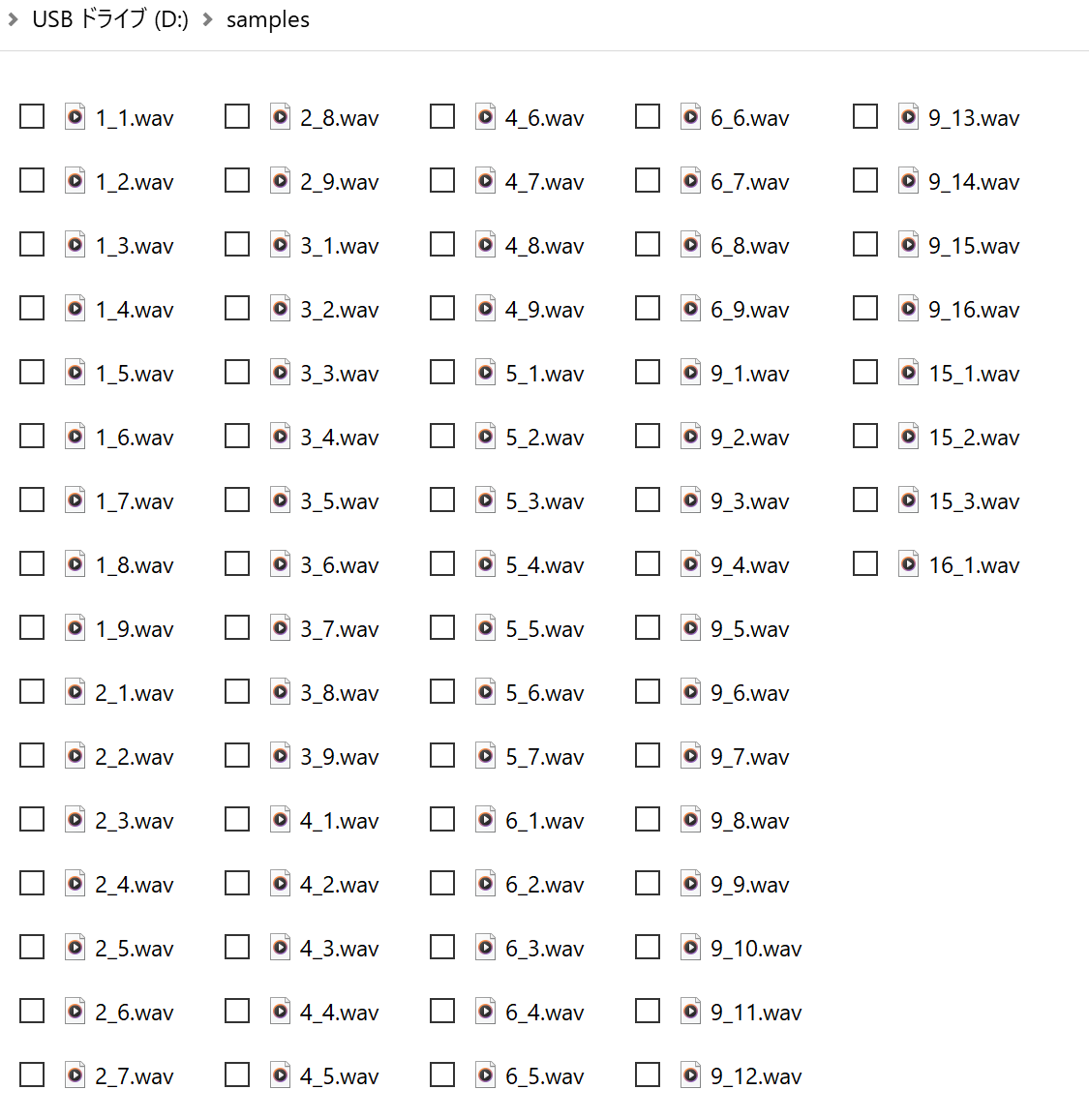
fig: Sample file directory
The sample files for test is here.
3.5.3. Operation
The Sampler effect has two modes: Play and Record.
By default, it is in Play mode.
You can toggle between the two modes by pressing Wind + Sprout Button.
The current mode can be determined by the Sprout LED's lighting status; it lights up purple when in Play mode and flashes purple when in Record mode.
3.5.3.1. Play Mode
Bank Select
You can change banks with the Wind + Time knob.
The Time LED and Meter LED colors change for each bank.(red->green->blue->yellow-> ...)
Slot Select
You can change the slot with the Time Knob.
The Meter LEDs indicate the available slot positions using the bank color.
The currently selected slot position is displayed in a brighter color.
You can also change the selected slot using CV input.
Play Sample
A trigger input to the GATE Input will play the sample in the selected slot.
Also, if an audio signal is input to the L/R Input, the signal will be mixed with the audio of the sample being played and output.
Change Speed
The Sun Knob allows you to change the playback speed of the sample.
The middle position is the same speed, the left is slower, and the right is faster.
Change Volume
The Wet Knob allows you to change the sample playback volume.
Tape Saturator Effect
The Wind + Sun knob sets the amount of tape saturation effect.
They recreate the flutter effect caused by tape aging and the effect of a bandpass filter.
The minimum setting gives 0% effect, and the maximum setting gives 100%.
Reverb Effect
Wind + Wet Knob sets the amount of reverb effect.
This reverb is a simplified algorithm of the FDN Reverb effect.
3.5.3.2. Record Mode
Through output of input audio signal
Like Play mode, the input audio signal is always mixtd to the audio output, regardless of whether recording is in progress.
Bank / Slot Select
Unlike Play mode, you can select banks and slots that do not contain samples.
(In this case, the Meter LED at the selected slot will light up in a fainter bank color.)
Start / Stop Recording
Pressing the Sprout Button will enter Record mode and begin recording the incoming audio signal to the selected slot position.
The Sprout LED will light red while recording.
Press the Sprout button again to stop recording and the Sprout LED will return to flashing purple.
The recording length is limited to the remained memory size of the SD card.
Another way to start recording is to hold down the Sprout button and input a trigger signal into the Gate Input, which will start recording in sync with the trigger signal.
Also in this case, pressing the Sprout button again will stop recording.
Reverb Effect
Like the Play mode, the Wind + Wet knob set the amount of reverb effect.
4. Firmware Update
There are 2 ways of the firmware update process.
If you have micro SD Card, it’s easy to upload by that.
If not, you can upload firmware by USB-DFU, but you needs to prepare DFU program.
4.1. Update by SD Card
Update Procedure:
- Put the firmware binary file (ex: “Sprout_factory_v2_0.bin”) on the root directory of the SD Card.
- Unmount the Sprout module from your rack, and insert the SD Card.
- Mount the Sprout module
- Power on your rack. Then the Sprout module is automatically updated.
4.2. Update by USB-DFU
FIrst, you needs to prepare DFU program for update by USB-DFU.
For example, “dfu-util” (https://dfu-util.sourceforge.net/) or “zadig”(https://zadig.akeo.ie/) , or etc ...
Update Procedure:
- Connect usb cable between pc and daisy seed.
- Press daisy seed’s reset button
- Upload the firmware binary file (ex: “Sprout_factory_v2_0.bin”) by DFU program within 2.5 seconds (while daisy’s led is flashing).
5. Warranty
We offer a one-year warranty on this product from the date of purchase, providing free repairs for any issues that occur during this period, with the exception of any failures that result from intentional modifications or destruction by the user, careless dropping, or incorrect connection of connectors such as power supplies.
Please note that you will be responsible for the shipping fee when sending the module for repair.
When requesting repairs, please submit a receipt from the store where you purchased the product or a statement of purchase as proof.
6. Contact
mail: centrevillage@gmail.com
site: https://centrevillage.net