
1. Introduction
Sprout is a high-resolution (96kHz/24bit) multi-effects processor based on the "Electro-Smith Daisy Seed”.
The preset effects available on Sprout are as follows:
- Tape Echo (Tape Emulation Delay, includes wow & flutter for a unique tone effect)
- Modern Delay (up to 10 seconds, with pitch shift and reverse capabilities)
- FDN Reverb (with pitch shift functionality)
ver2.0:
- Repeater (Record the input sound and repeat it by specifying the range)
- Sampler (Place samples in 16x16 slots and play them when the Gate is input)
ver3.0:
- String Resonator (Resonates virtual strings with the input sound. Includes electric bass / electric guitar modes)
- MIDI input (Parameter control by CC, playing notes on the String Resonator, MIDI Clock sync for the Repeater)
Additionally, if you are a programmer, you have the ability to program your own custom effects. You can refer to the GitHub page for Sprout's programming examples at: https://github.com/centrevillage/SproutExample
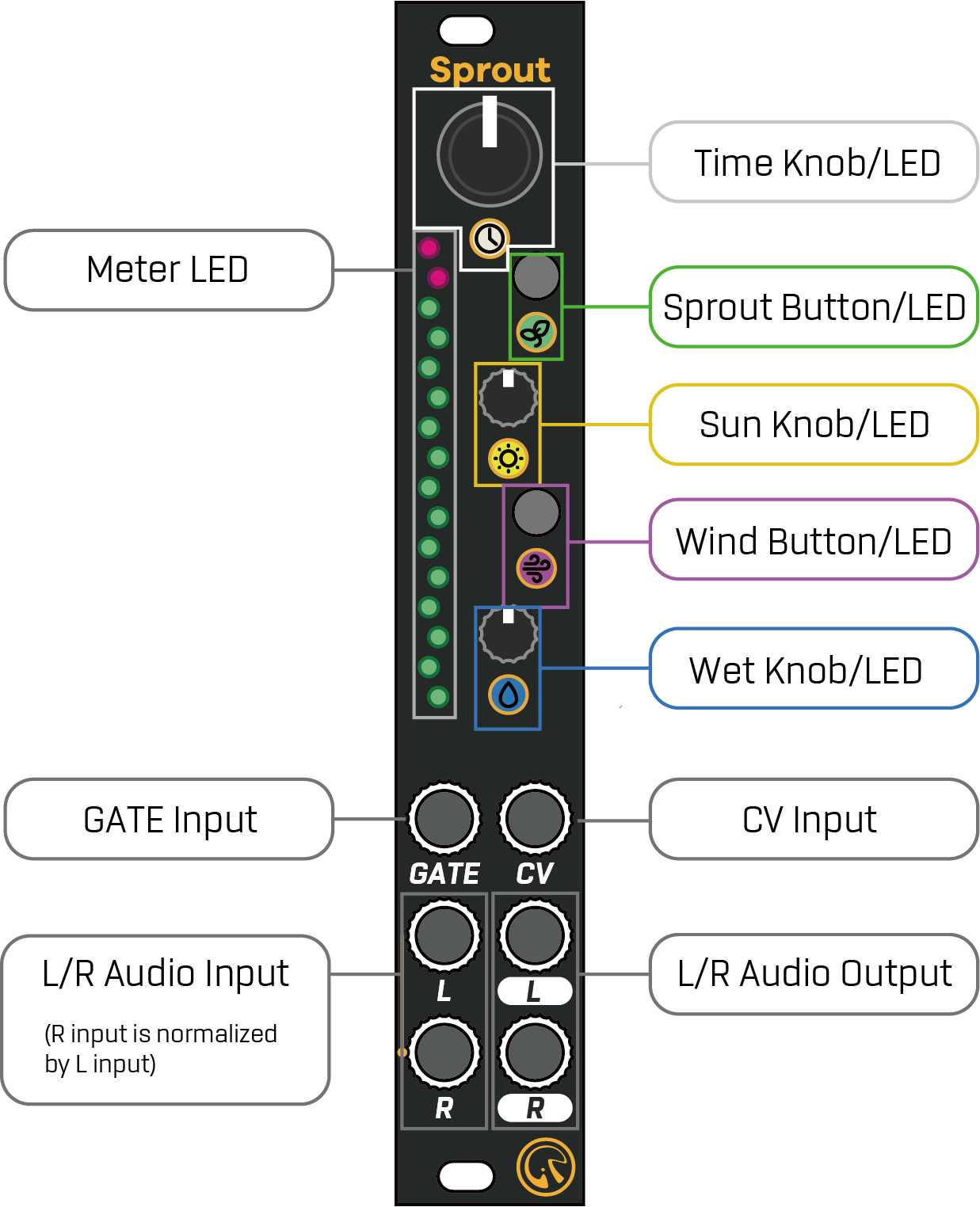
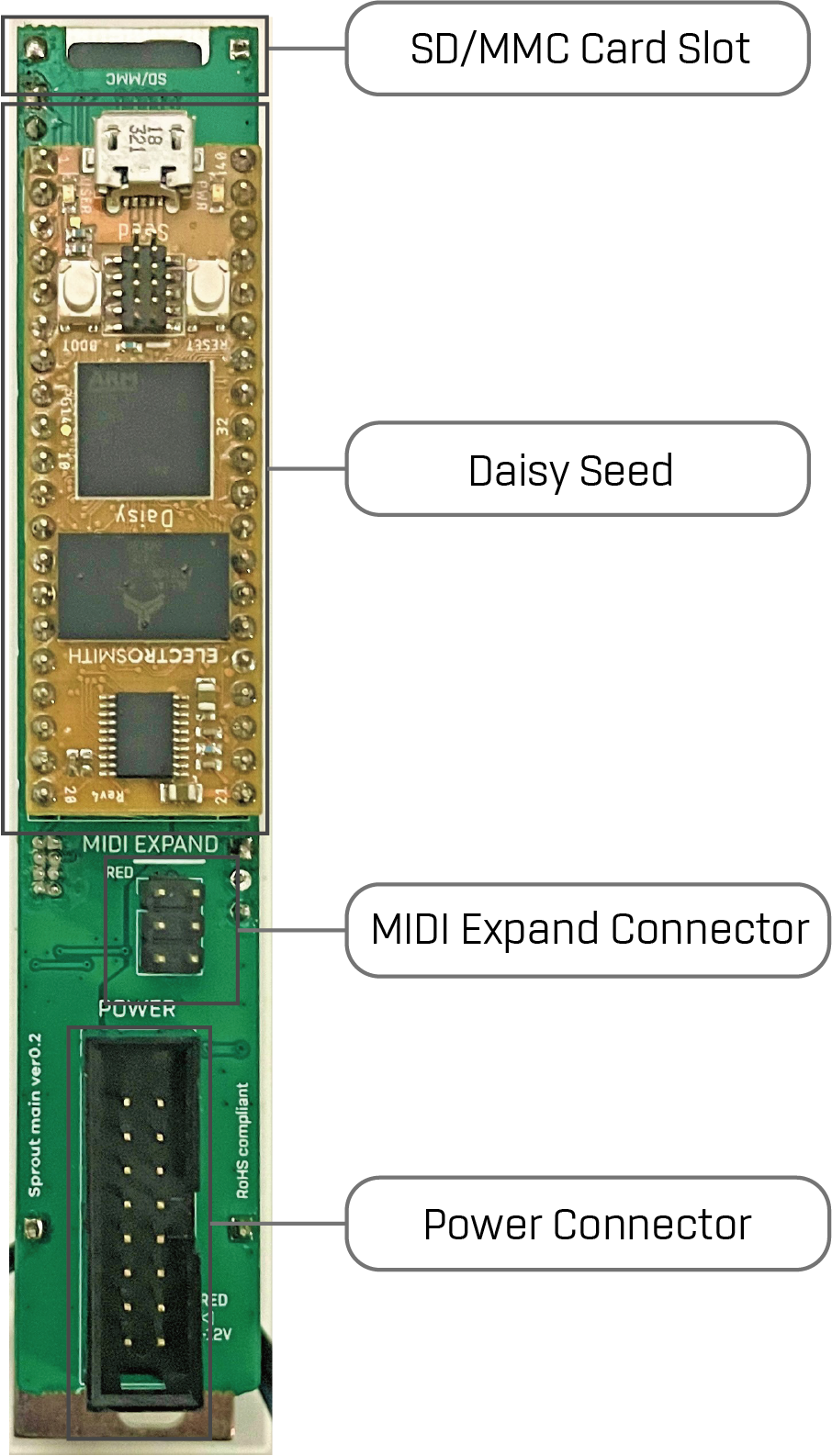
2. Hardware Interface
3. Factory Program
Factory Program has following 6 effects:
- Tape Echo
- Modern Delay
- FDN Reverb
- Repeater (ver 2.0)
- Sampler (ver 2.0)
- String Resonator (ver 3)
And each control on Sprout has the following functions:
| Name | Description |
|---|---|
| Time Knob/LED | Adjust the time-like parameter. The LED indicates the current value by its level of brightness. If you press and hold the Wind button, it allows you to modify the secondary parameter. |
| Sun Knob/LED | Adjust the feedback-like parameter. The LED indicates the current value by its level of brightness. If you press and hold the Wind button, it allows you to modify the secondary parameter. |
| Wet Knob/LED | Adjust the dry/wet balance. The LED indicates the current value by its level of brightness. If you press and hold the Wind button, it allows you to modify the secondary parameter. |
| Sprout Button/LED | Change the current preset. The LED indicates the current effect by the color. |
| Wind Button/LED | Tap-tempo function. If you press and hold this button, it allows you to access the secondary parameter. * On the String Resonator, a double tap switches a tone option instead of the tap tempo (ver 3) |
| Meter LED | Indicate the output level as dB meter. The color of the meter, excluding the peak position, changes based on the current effect. |
| Gate Input | Clock Sync input. If the input receives a clock pulse, the time-based parameter synchronizes to this clock. Responds to the rising edge of the clock pulse (ver 3) If the input doesn't receive a clock pulse for 2 seconds, the clock sync function gets disabled. * Disabled for FDN Reverb * On the String Resonator, it is the trigger input that plucks the strings (ver 3) |
| CV input | Modulate the Time parameter. * On the String Resonator, it is the pitch input (V/oct) (ver 3) |
| L/R Audio Input | L/R Audio Input |
| L/R Audio Output | L/R Audio Output |
3.1. Tape Echo
If the current effect is Tape Echo, Sprout LED color is green.
This effect has following parameters:
| Operation | Name | Description |
|---|---|---|
| Time | Delay Time | Delay Time from about 50 msec to 1 sec When the delay time changes, the tape speed follows smoothly, like the inertia of a tape motor (ver 3) |
| Sun | Feedback | Feedback rate up to 110% The feedback starts to saturate at about the same knob position whatever the Wind + Time (Tone) setting (ver 3) |
| Wet | Dry/Wet | Dry (direct signal) / Wet (effect signal) balance from Dry=100% and Wet=0% to Dry = 0% and Wet = 100%. The center position is Dry=100% and Wet=100%. |
| Wind + Time | Tone | Feedback Tone and Saturation. Left position: Darker saturated tone Center position: Clean tone Right position: Brighter saturated tone |
| Wind + Sun | Flutter | Flutter effect emulation. The higher the value, the more unstable the pitch. |
| Wind + Wet | Spread | Double-Tracking like stereo effect with ping pong. The higher the value, the echo sound is more spread in the stereo image. |
3.2. Modern Delay
If the current effect is Modern Delay, Sprout LED color is blue.
This effect has following parameters:
| Operation | Name | Description |
|---|---|---|
| Time | Delay Time | Delay Time from about 50 msec to 10 sec |
| Sun | Feedback | Feedback rate up to 110% Tuned so that raising the feedback does not make only the highs or the sub-lows oscillate first (ver 3) |
| Wet | Dry/Wet | Dry (direct signal) / Wet (effect signal) balance from Dry=100% and Wet=0% to Dry = 0% and Wet = 100%. The center position is Dry=100% and Wet=100%. |
| Wind + Time | Tone | Feedback Tone. Left position: Darker tone Center position: Clean tone Right position: Brighter tone |
| Wind + Sun | Pitch Shift | Pitch shift the feedback sound. Left position: -1 to -12 semitones pitch shift Center position: no pitch shift Right position: +1 to +12 semitones pitch shift |
| Wind + Wet | Reverse | Reverse play the feedback sound. Left position: Reverse Right position: Forward |
3.3. FDN Reverb
If the current effect is FDN* Reverb, Sprout LED color is yellow.
* FDN = Feedback Delay Network
This effect has following parameters:
| Operation | Name | Description |
|---|---|---|
| Time | Size | Room Size. The higher the value, the reflection sound is more sparse and similar with delay sound. |
| Sun | Decay | The higher the value, the reflection sound has more long decay time. |
| Wet | Dry/Wet | Dry (direct signal) / Wet (effect signal) balance from Dry=100% and Wet=0% to Dry = 0% and Wet = 100%. The center position is Dry=100% and Wet=100%. |
| Wind + Time | Tone | Left position: Darker reflection tone Center position: Clean reflection tone Right position: Brighter reflection tone |
| Wind + Sun | Shimmer (ver 3) | Mixes the reflection sound pitch-shifted one octave up / down into the reflections. (The so-called “Shimmer”) Left position: One octave down Center position: No shimmer Right position: One octave up The farther from the center position, the more shimmer. |
| Wind + Wet | Diffusion | Diffusion for the reflection sound. The higher the value, the reflection sound is more diffuse in space |
3.4. Repeater (ver 2.0)
When the current effect is Repeater, the Sprout LED will light blue.
When using this effect, input a sync clock pulse into the GATE Input.
It can also sync to MIDI Clock (ver 3) (see Section 4.3).
The Repeater effect has two states: Listen and Play.
It is initially in the Listen state.
When in Listen state, the input audio signal is continuously recorded for a maximum of 16 steps.
Also, the input audio signal is output as is.
When in the Play state, it plays back the audio that was recorded when in the Listen state.
Pressing the Wind Button toggles between Listen and Play states.
The current state can be determined by the lighting state of the Meter LED.
When in Listen state, the color representing the playback range is blue or purple (for reverse playback).
When in Play state, the color that indicates the playback range is green or red (for reverse playback).
Additionally, the step position currently being played will be brightly lit.
You can also change the playback position, speed, etc. of the audio by doing the following:
| Operation | Name | Description |
|---|---|---|
| Time | Speed | Change the playback speed. The left position slows the playback speed, the middle position keeps the original speed, and the right position speeds the playback speed up. The clock is always synchronized even when the playback speed is changed. |
| Sun | Start Position | Changes the playback start position. |
| Wet | Length | Sets the playback step length. The step length can be set to a positive or negative value. The right position of the knob plays the audio forward. The left position of the knob plays the audio backwards. |
| Wind + Sun | Random Start Position | Randomly moves the playback start position in Play state. The higher the value, the easier it is to move to a far step. |
| Wind + Wet | Dry / Repeat Balance | Sets the volume balance between the input audio and the playback audio in the Play state. At the leftmost position, Dry=100%, Repeat=0%. At the middle position, Dry=100%, Repeat=100%. At the rightmost position, Dry=0%, Repeat=100%. |
3.5. Sampler (ver 2.0)
When the current effect is Sampler, the Sprout LED lights purple.
When using this effect, be sure to start the module with a Micro SD card inserted.
(If no SD card is inserted or the “samples” directory does not exist, this effect cannot be selected.)
The SD card can hold 16 banks x 16 slots (256 samples in total) of audio files.
The Sampler effect allows you to play samples stored on an SD card when a trigger signal is received at the GATE Input.
It is also possible to record the audio input signal.
The audio length is limited only by the memory size of the SD card.
3.5.1. SD Card Condition
Micro SD cards that meet the following requirements are accepted:
- Memory size is 32GB or less.
- Application Performance Class is A2
The Micro SD card compatibility is as follows:
| Name | Confirmation |
|---|---|
| Gigastone 32GB 4K Camera Pro | OK (Write & Read) |
3.5.2. Sample File
Create a “samples” directory under the root directory of the SD card and place each sample file in it.
The file name must follow this format:
“Bank Number(1-16)”_”Slot Number(1-16)”.wav
(ex: 1_1.wav, 2_3.wav, etc ...)
Supports 44.1/48/96kHz 16/24-bit or 32-bit float stereo wav files.
Files that contain meta information such as track information can be loaded as they are (ver 3).
When you record, a corresponding wav file will be automatically created on the SD card.
The format will be fixed at 96kHz, 32-bit float, and stereo.
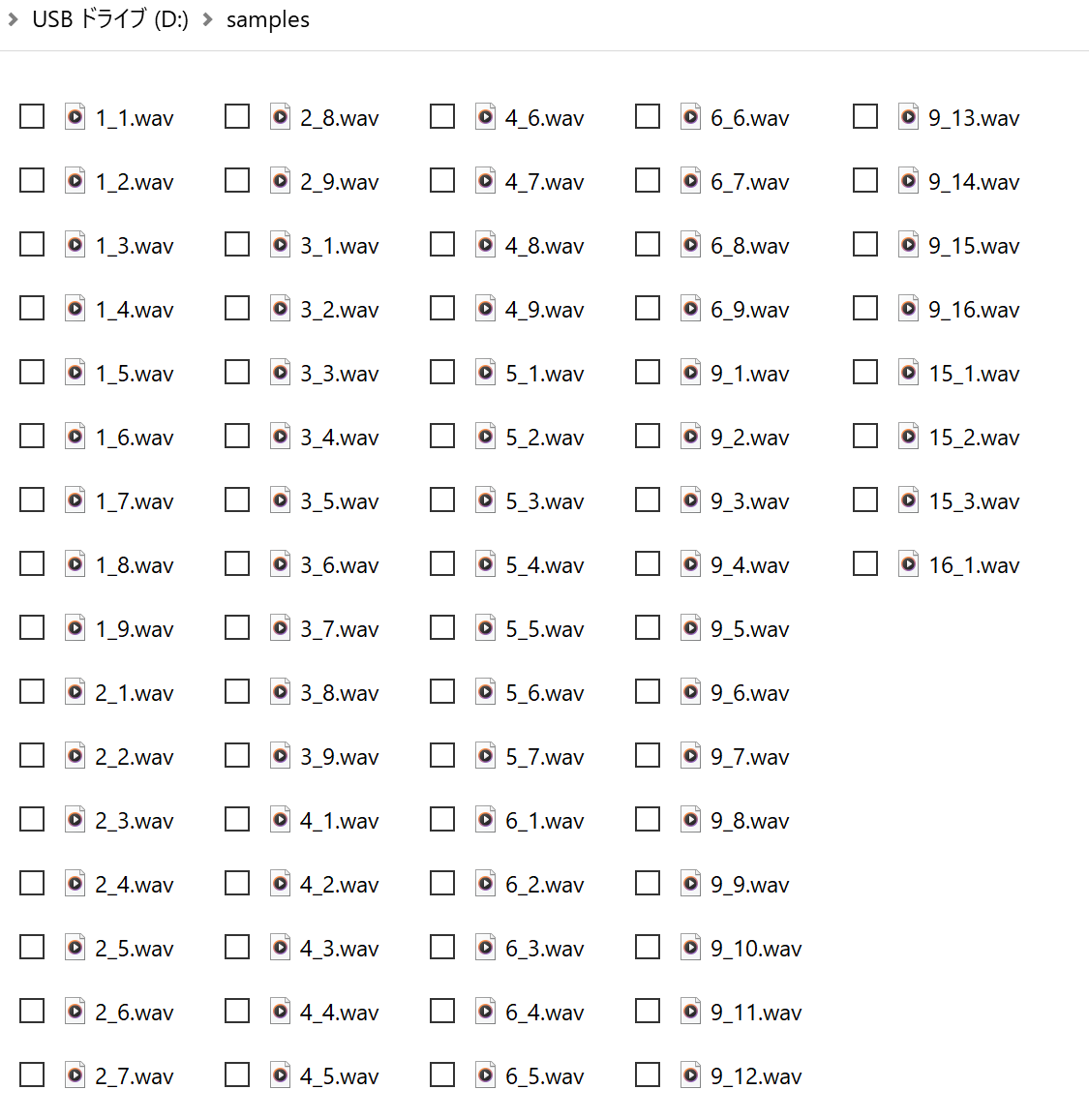
fig: Sample file directory
The sample files for test is here.
3.5.3. Operation
The Sampler effect has two modes: Play and Record.
By default, it is in Play mode.
You can toggle between the two modes by pressing Wind + Sprout Button.
The current mode can be determined by the Sprout LED's lighting status; it lights up purple when in Play mode and flashes purple when in Record mode.
3.5.3.1. Play Mode
Bank Select
You can change banks with the Wind + Time knob.
The Time LED and Meter LED colors change for each bank.(red->green->blue->yellow-> ...)
Slot Select
You can change the slot with the Time Knob.
The Meter LEDs indicate the available slot positions using the bank color.
The currently selected slot position is displayed in a brighter color.
You can also change the selected slot using CV input.
Play Sample
A trigger input to the GATE Input will play the sample in the selected slot.
Also, if an audio signal is input to the L/R Input, the signal will be mixed with the audio of the sample being played and output.
To suppress click noise, a retrigger during playback crossfades from the previous sound to the new one over about 1 msec, and the last about 1 msec of a sample fades out (ver 3).
The length can be changed or disabled in the settings file (see Section 5).
Change Speed
The Sun Knob allows you to change the playback speed of the sample.
The middle position is the same speed, the left is slower, and the right is faster.
Change Volume
The Wet Knob allows you to change the sample playback volume.
Tape Saturator Effect
The Wind + Sun knob sets the amount of tape saturation effect.
They recreate the flutter effect caused by tape aging and the effect of a bandpass filter.
The minimum setting gives 0% effect, and the maximum setting gives 100%.
Reverb Effect
Wind + Wet Knob sets the amount of reverb effect.
This reverb is a simplified algorithm of the FDN Reverb effect.
3.5.3.2. Record Mode
Through output of input audio signal
Like Play mode, the input audio signal is always mixed to the audio output, regardless of whether recording is in progress.
Bank / Slot Select
Unlike Play mode, you can select banks and slots that do not contain samples.
(In this case, the Meter LED at the selected slot will light up in a fainter bank color.)
Start / Stop Recording
Pressing the Sprout Button will enter Record mode and begin recording the incoming audio signal to the selected slot position.
The Sprout LED will light red while recording.
Press the Sprout button again to stop recording and the Sprout LED will return to flashing purple.
The recording length is limited to the remained memory size of the SD card.
Another way to start recording is to hold down the Sprout button and input a trigger signal into the Gate Input, which will start recording in sync with the trigger signal.
Also in this case, pressing the Sprout button again will stop recording.
Reverb Effect
Like the Play mode, the Wind + Wet knob set the amount of reverb effect.
By default, only the input sound is recorded, and the reverb effect is applied to the output only.
The settings file can make the recorded samples include the reverb effect (see Section 5).
3.6. String Resonator (ver 3)
If the current effect is String Resonator, Sprout LED color is emerald green.
String Resonator resonates virtual strings with the input audio signal.
A trigger at the GATE Input plucks the strings (strum) and the CV Input (V/oct) sets the pitch, so it can also be played as a sound source.
It is based on the Sympathetic Strings model of Mutable Instruments Rings (MIT License, see Section 10), with electric bass and electric guitar modes added.
Only the string sound is output (the dry signal is not included).
The Meter LED shows the output level in emerald green.
3.6.1. Voice Mode
The Wind + Time Knob selects the string configuration (voice mode).
There are the following 6 modes, in order from the left of the knob. While the Wind Button is held, the color of the Time LED shows the current mode.
| Mode | Time LED | Description |
|---|---|---|
| B | purple | Electric bass. 1 voice (2 strings). Base note C2. With an amp + cabinet simulation (see Section 3.6.3) |
| G | blue | Electric guitar. 4 voices (2 strings per voice). Base note C3. With an amp + cabinet simulation (see Section 3.6.3) |
| 1 | red | 1 voice (1 main string + 7 sympathetic strings). Base note C3 |
| 2 | orange | 2 voices (1 main string + 3 sympathetic strings per voice). Base note C3 |
| 4 | green | 4 voices (1 main string + 1 sympathetic string per voice). Base note C3. Default |
| 8 | white | 8 voices (1 string per voice, no sympathetic strings). Base note C3 |
The base note is the pitch when the CV Input is at 0V (unconnected) and Transpose is at the center position.
Each strum moves to the next voice in turn, and the voices played before keep decaying.
Changing the voice mode stops the strings that are sounding.
3.6.2. Parameters (1 / 2 / 4 / 8)
In the voice modes 1 / 2 / 4 / 8, this effect has the following parameters:
| Operation | Name | Description |
|---|---|---|
| Time | Transpose | Transposes the pitch in semitones. -12 semitones at the leftmost position, ±0 at the center position, +12 semitones at the rightmost position. |
| Sun | Brightness | Brightness of the string tone. The higher the value, the brighter the sound, with more high frequencies. |
| Wet | Damping | Decay time of the strings. The higher the value, the longer the strings ring. About 0.07 sec at the leftmost position, about 4.5 sec at the center position, and near the rightmost position the strings no longer decay. |
| Wind + Time | Voice Mode | Voice mode (see Section 3.6.1) |
| Wind + Sun | Structure / Position | 1 / 2 / 4 voices (Structure): the combination of the pitches of the sympathetic strings. Toward the left, the sympathetic strings are tuned lower (the base note, an octave below, a fifth below, etc.), and toward the right higher (a fifth above, an octave above, two octaves above, etc.). 8 voices (Position): the position where the string is plucked and where its sound is picked up. At the center position, the even harmonics become weaker. |
| Wind + Wet | Spread | Stereo width. Each strum places the voices from left to right in turn (left and right alternately with 1 voice). At the leftmost position all voices are in the center, and at the rightmost position the sound is widest. The default is the leftmost position. |
| Wind double tap | Damping Filter | Turns on / off the filter that damps the high frequencies of the decay first (the same damping as the production Rings). When off, the highs of the decay remain and the sound is brighter. The default is on. While on, the Wind LED lights emerald green. (The setting is not saved; it returns to on at the next power-on) |
| Wind + Sprout | Pitch Detection Mode | Turns the pitch detection mode on / off (see Section 3.6.5) |
| Wind + Sprout (2 sec) | CV Calibration | Calibrates the CV Input (see Section 3.6.6) |
A Wind double tap means pressing the Wind Button briefly twice within 0.4 seconds.
3.6.3. Parameters (B / G)
In the voice modes B (electric bass) / G (electric guitar), this effect has the following parameters.
In both modes, one voice is made of 2 strings (the horizontal and the vertical vibration of a string) that ring with slightly different pitches and decays, which recreates the two-stage decay and the beating of a real string.
The sound sits in the center (L / R carry the same signal).
Since B has 1 voice, each strum plucks the same strings again.
| Operation | Name | Description |
|---|---|---|
| Time | Transpose | Transposes the pitch in semitones (-12 to +12 semitones). |
| Sun | Hardness | Plucking strength. B: Left: finger → Center: pick → Right: slap G: Left: soft picking → Right: hard picking The harder the pluck, the brighter the sound, and the pitch rises slightly at the attack. Toward the right, the buzz of the string hitting the frets is added. The strength and the plucking position vary slightly with each pluck. |
| Wet | Damping | Decay time of the strings (the same as Section 3.6.2). |
| Wind + Time | Voice Mode | Voice mode (see Section 3.6.1) |
| Wind + Sun | Pickup Position | Position of the pickup. Left position: Near the bridge (hard, thin sound) Right position: Away from the bridge (thick, round sound) |
| Wind + Wet | Amp Drive | Drive of the amp + cabinet simulation. At the leftmost position the sound does not go through the amp (bypass, default). Toward the right, the distortion gets stronger. |
| Wind double tap | Dispersion | Turns on / off the inharmonicity (the overtones shifted by the stiffness of the string). When on, the sound is metallic and taut. The default is on. While on, the Wind LED lights purple in B and blue in G. (The setting is not saved; it returns to on at the next power-on) |
| Wind + Sprout | Pitch Detection Mode | Turns the pitch detection mode on / off (see Section 3.6.5) |
| Wind + Sprout (2 sec) | CV Calibration | Calibrates the CV Input (see Section 3.6.6) |
3.6.4. Strum / Pitch / Excitation
Strum (GATE Input)
A trigger / gate signal at the GATE Input plucks the strings of the next voice at its rising edge (strum).
When the gate stays on longer than 40 msec, that voice keeps ringing without decaying while the gate is on.
When the gate turns off, the voice returns to the decay of the Wet Knob (Damping).
A short trigger rings with the decay of the Wet Knob.
Pitch (CV Input)
The CV Input is a V/oct pitch input.
The pitch of the strings is the base note + Transpose + the voltage at the CV Input (1V = 1 octave).
The pitch of the last strummed voice follows the CV Input.
The accuracy of the CV Input can be calibrated as described in Section 3.6.6.
Excitation (L/R Audio Input)
The audio signal at the L/R Input makes the strings of the last strummed voice resonate.
L and R are used alternately with each strum (when the R Input is unconnected, the signal of the L Input also feeds R).
When the L Input has been silent for 3 seconds or more, an internal exciter (a noise burst in 1 / 2 / 4 / 8, a waveform of a finger or pick pluck in B / G) plucks the strings at each strum.
As soon as sound comes into the L Input, the strings resonate with the input signal again.
Right after String Resonator is selected, the internal exciter is active.
MIDI
MIDI notes can also pluck the strings (see Section 4).
3.6.5. Pitch Detection Mode
Pressing and releasing the Sprout Button while holding the Wind Button toggles the pitch detection mode on / off.
While it is on, the Sprout LED slowly fades in and out.
In the pitch detection mode, the pitch of a single note at the R Input (such as a basic VCO waveform) is detected, and the pitch of the last strummed voice follows it.
Transpose and the voltage at the CV Input are added to the detected pitch.
The excitation always uses the L Input (the internal exciter when the L Input has been silent for 3 seconds or more).
The pitch detection mode is kept when the power is turned off. Switching to another effect turns it off.
3.6.6. CV Calibration
With a VCO that tracks 1V/oct accurately, you can calibrate the V/oct accuracy of the CV Input (the 0V position and the width of one octave).
The calibration is kept when the power is turned off, and also after a factory reset (see Section 7).
What you need:
- A VCO that tracks 1V/oct accurately
- A CV source (a keyboard, a sequencer, etc.) for the V/oct input of the VCO, and a multiple to split its output
Procedure:
- On the String Resonator, hold the Wind Button and press the Sprout Button for 2 seconds.
The calibration mode starts: the Sprout LED blinks orange, the sound stops, and the top of the Meter LED blinks slowly. - With the cable unplugged from the CV Input, press the Sprout Button (the 0V measurement).
The top of the Meter LED lights. - Split the output of the CV source into both the CV Input and the V/oct input of the VCO, and connect the output of the VCO to the R Input.
- Press the Sprout Button each time you change the voltage of the CV source (one measurement takes 0.2 sec).
With each measurement, the Meter LED lights one more step from the top.
Measure at least 2 points over a range of at least one octave (4 to 5 points, for example 0V to 4V, are recommended).
When the pitch cannot be detected, the Meter LED flashes red and that point is not used. - A short press of the Wind Button computes and saves the calibration.
On success all Meter LEDs light green, on failure red, for 0.5 sec, and then the normal display returns (on failure, the previous calibration is kept).
To quit midway, hold the Wind Button for 2 seconds (nothing is saved).
To clear the calibration and return to the factory values, enter the calibration mode and press the Wind Button briefly without measuring.
4. MIDI (ver 3)
Sprout receives MIDI messages to control the parameters (all effects), play the String Resonator, and sync the Repeater to the clock.
For MIDI input and output, connect the separately sold MIDI expansion module MIDI CoM+ to the MIDI Expand Connector on the back.
When connecting, align the red line of the cable with the side of the “RED” mark on the board (do not insert it the other way round).
The default MIDI receive channel is 1. It can be changed in the settings file on the SD card (see Section 5).
4.1. Control Change
On all effects, the following CCs control the 6 parameters:
| CC | Parameter |
|---|---|
| 16 | Time |
| 17 | Sun |
| 18 | Wet |
| 19 | Wind + Time |
| 20 | Wind + Sun |
| 21 | Wind + Wet |
The CC values 0 to 127 correspond to the knob positions from the leftmost to the rightmost.
Parameters with fine steps change smoothly between the CC values.
Values changed by CC are not saved; after a power cycle, the knob values apply again. They are not shown on the knob LEDs either.
When you move a knob after its value was changed by CC, the knob takes effect from the point where it passes the position of the current value.
4.2. String Resonator
The String Resonator can be played with the following messages:
| Message | Description |
|---|---|
| Note On / Off | Plucks the strings of the next voice at the pitch of the note (+ Transpose). The voltage at the CV Input is not added. When a note is held longer than 40 msec, that voice keeps ringing without decaying while the note is held, and returns to the decay of the Wet Knob at Note Off. Chords can be played (up to the number of voices at once). |
| Velocity | Added to the value of Sun (Brightness, Hardness in B / G). 64 leaves it unchanged, 1 lowers it by half the knob range, and 127 raises it by half the knob range. Can be disabled in the settings file (see Section 5). |
| Pitch Bend | Changes the pitch of all voices within ±2 semitones. |
With a sequencer that sends a fixed velocity, set the velocity to 64 or disable the velocity in the settings file.
4.3. Repeater
The Repeater can sync to MIDI Clock:
| Message | Description |
|---|---|
| Clock | Syncs with 6 clocks (a 16th note) as 1 step (the same as 1 clock at the GATE Input). |
| Start | The next clock becomes a step boundary. |
While a clock is input to the GATE Input, the GATE Input has priority.
When the clock at the GATE Input stops for 2 seconds or more (4 times the clock interval or more for a slow clock), the Repeater syncs to MIDI Clock.
4.4. MIDI Thru
Received MIDI Clock / Start / Continue / Stop messages are sent to the MIDI output as they are (all effects).
5. Settings File (config.ini) (ver 3)
Placing a text file named “config.ini” in the root directory of the SD card changes the settings.
The file is read only once at power-on (after changing the file, turn the module off and on again).
When there is no file, or a value cannot be read, the default value is used.
[midi]
; 1..16
channel = 1
; on / off
velocity = on

[sampler]
; 0..10 (ms), 0 = off
declick_ms = 1.0
; on / off
rec_reverb = off| Section | Key | Value | Description |
|---|---|---|---|
| [midi] | channel | 1 to 16 (default 1) | The MIDI receive channel |
| [midi] | velocity | on / off (default on) | Whether the String Resonator uses the velocity (see Section 4.2) |
| [sampler] | declick_ms | 0 to 10, decimals allowed (default 1.0) | The length (msec) of the crossfade at a retrigger and of the fade-out at the end of a sample in the Sampler. 0 disables them (see Section 3.5.3.1) |
| [sampler] | rec_reverb | on / off (default off) | Whether the samples recorded in the Record Mode of the Sampler include the reverb effect (see Section 3.5.3.2) |
Write comments on their own lines, starting with ; or #.
A comment written after a value makes the value unreadable, and the default value is used.
6. Firmware Update
There are 2 ways of the firmware update process.
If you have micro SD Card, it’s easy to upload by that.
If not, you can upload firmware by USB-DFU, but you need to prepare a DFU program.
Updating from ver 2.0 or earlier to ver 3.0 resets the saved settings (the selected effect and the parameter values).
6.1. Update by SD Card
Update Procedure:
- Put the firmware binary file (ex: “Sprout_firm_v3_0.bin”) on the root directory of the SD Card.
- Power off your rack.
- Unmount the Sprout module from your rack, and insert the SD Card.
- Mount the Sprout module.
- Power on your rack. Then the Sprout module is automatically updated.
- After the update, delete the firmware binary file from the SD card.
(If you leave it, the firmware is written again at every power-on)
6.2. Update by USB-DFU
First, you need to prepare a DFU program for update by USB-DFU.
For example, “dfu-util” (https://dfu-util.sourceforge.net/) or “zadig”(https://zadig.akeo.ie/) , or etc ...
Update Procedure:
- Connect usb cable between pc and daisy seed.
- Press daisy seed’s reset button
- Upload the firmware binary file (ex: “Sprout_firm_v3_0.bin”) by DFU program within 2.5 seconds (while daisy’s led is flashing).
7. Factory Reset
Powering on while holding both the Sprout Button and the Wind Button returns the saved settings (the selected effect, the parameter values, and the pitch detection mode of the String Resonator) to the factory state.
Release the buttons when all LEDs light green.
The calibration of the CV Input (see Section 3.6.6) is not cleared.
8. Warranty
We offer a one-year warranty on this product from the date of purchase, providing free repairs for any issues that occur during this period, with the exception of any failures that result from intentional modifications or destruction by the user, careless dropping, or incorrect connection of connectors such as power supplies.
Please note that you will be responsible for the shipping fee when sending the module for repair.
When requesting repairs, please submit a receipt from the store where you purchased the product or a statement of purchase as proof.
9. Contact
mail: centrevillage@gmail.com
site: https://centrevillage.net
10. License
String Resonator is based on the source code of Mutable Instruments Rings (MIT License).
- Mutable Instruments Rings (https://github.com/pichenettes/eurorack): Copyright 2015 Emilie Gillet.
- stmlib (https://github.com/pichenettes/stmlib): Copyright 2014 Emilie Gillet.
Permission is hereby granted, free of charge, to any person obtaining a copy
of this software and associated documentation files (the "Software"), to deal
in the Software without restriction, including without limitation the rights
to use, copy, modify, merge, publish, distribute, sublicense, and/or sell
copies of the Software, and to permit persons to whom the Software is
furnished to do so, subject to the following conditions:

The above copyright notice and this permission notice shall be included in
all copies or substantial portions of the Software.

THE SOFTWARE IS PROVIDED "AS IS", WITHOUT WARRANTY OF ANY KIND, EXPRESS OR
IMPLIED, INCLUDING BUT NOT LIMITED TO THE WARRANTIES OF MERCHANTABILITY,
FITNESS FOR A PARTICULAR PURPOSE AND NONINFRINGEMENT. IN NO EVENT SHALL THE
AUTHORS OR COPYRIGHT HOLDERS BE LIABLE FOR ANY CLAIM, DAMAGES OR OTHER
LIABILITY, WHETHER IN AN ACTION OF CONTRACT, TORT OR OTHERWISE, ARISING FROM,
OUT OF OR IN CONNECTION WITH THE SOFTWARE OR THE USE OR OTHER DEALINGS IN
THE SOFTWARE.